Update a Listed System to NLC V5.2
The NLC V5.2 Technical Requirements are the current requirements for listing on the DLC Networked Lighting Controls Qualified Products List (QPL).
Before You Apply: Prepare Your V5.2 Materials
- To qualify for thermostat integration, the system must have External Systems Integration capability. If the current listing does not already indicate this, you’ll be asked to confirm it before the thermostat-integration questions appear.
- Read the NLC–Thermostat Integration Submission Guide
- The guide explains the thermostat-integration requirements, the documentation required to support each capability claim, and which party provides each document (NLC manufacturer or thermostat manufacturer). Reading it first is the single best way to avoid the missing or misattributed-documentation issues that delay reviews.
- NLC–Thermostat Manufacturer Agreement signer details: The full name and email of the authorized signer for each party-the NLC manufacturer and the thermostat manufacturer. The Agreement is signed via DocuSign; after you submit, DocuSign routes it to both signers.
- To understand the ANSI C137.9 requirements, visit the ANSI website; a sample report generated by the system must be submitted with the application to claim this capability.
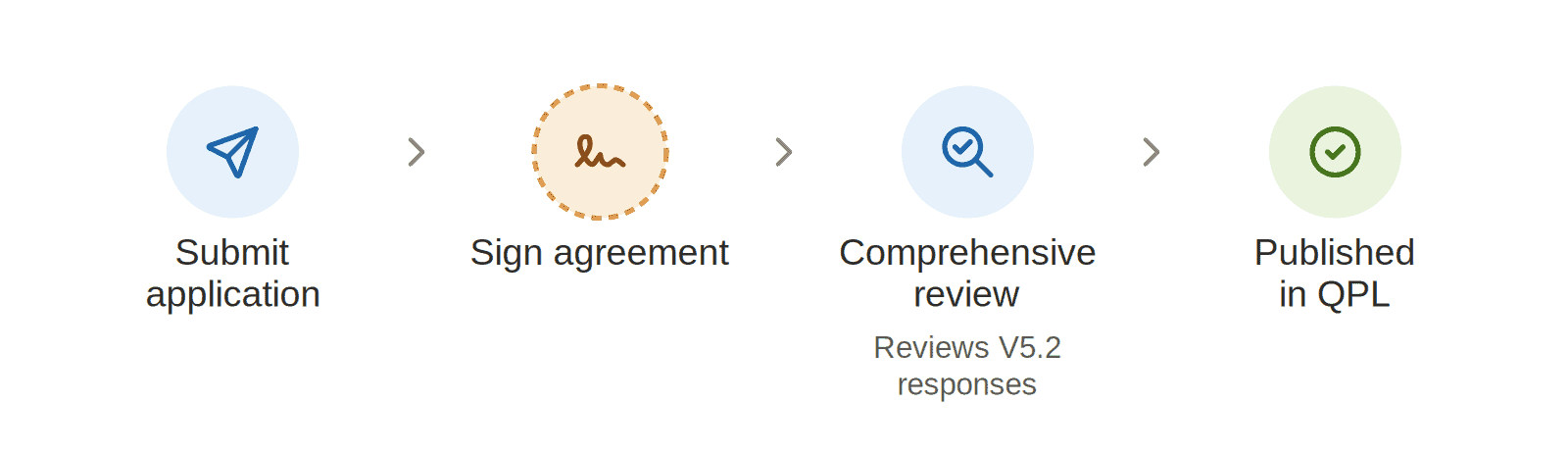
How to Submit An Update Application
- Log in to the application portal and select the NLC OEM – Update application.
- Open the streamlined V5.2 Update form, which shows only the new V5.2 questions. To revise other capabilities of your listing at the same time, use the option at the bottom of the form to update additional sections.
- Answer the applicable V5.2 questions.
- For every question you answer, attach supporting documentation and provide a reference citation in the NLC–Thermostat Integration Submission . Make sure each citation points to the exact place in the document that demonstrates the capability claimed.
- Complete the NLC–Thermostat Manufacturer Agreement signer information.
- Submit Application.
Entering multiple thermostats
If your system integrates with more than one thermostat, you can enter multiple thermostat models. Each model generates its own set of questions and its own NLC–Thermostat Manufacturer Agreement, and each agreement must be signed by both parties.
“Awaiting Signature” status
When an application includes thermostat integration, it is held in an Awaiting Signature status after submission. All required DocuSign agreements must be signed by both the NLC manufacturer and the thermostat manufacturer before the application moves into review. Applications missing a signature will not advance – confirm both signers’ names and email addresses are correct to avoid delays.
Is there a deadline to update?
There is currently no deadline to update an existing listing to V5.2. Your currently qualified system remains on the QPL, subject to completing payment of annual renewal fees.
That said, adhering to the latest version is strongly encouraged. New versions are developed based on feedback and priorities from our member utilities, so updating your listing ensures that your product continues to align with evolving program needs and customer expectations.
Note that a listing can qualify under V5.2 if the update application answers the new thermostat-integration questions or the ANSI C137.9 configuration-report question. Listings that do not add these capabilities remain displayed under V5.

Before You Submit: Avoiding Common Delays
- Missing signatures. The application stays in Awaiting Signature until both the NLC and thermostat manufacturers sign in DocuSign. Confirm both signer names and email addresses before submitting.
- Missing upload or citation. Every answered question needs both a document and a reference citation – either one missing will hold up review.
- Answering “No” to a required thermostat-integration capability. For thermostat listings, the core occupancy-data capability is required. If your system doesn’t have it, the system cannot be listed for thermostats – review the submission guide carefully before completing those questions.
- Single-source documentation where both are required. For the digital-occupancy-response and %-occupancy questions, provide NLC and thermostat documentation.
- Thermostat documentation that doesn’t show the capability. The thermostat’s own spec sheet must show it can receive and respond to the NLC’s occupancy data (and, for %-occupancy, respond to percentage data from multiple sensors).
- Incomplete gateway details. If you indicate a gateway is required, provide the gateway manufacturer, model name, and model number with a spec sheet of the gateway.
- No sample C137.9 report. If you answer “Yes” to the ANSI C137.9 configuration-report question, attach the sample report.
A Note on Technical Requirements Versions
V5.2 applies to the Indoor scope only. This is because the two focus areas introduced in V5.2 – thermostat integration and ANSI C137.9 configuration reporting apply to indoor applications. A system qualifies under V5.2 by meeting the requirements for either one.
Because V5.2 is Indoor-only:
- If you have an Outdoor listing, no V5.2 updates are required – V5.2 does not affect Outdoor scope.
- If you add an Outdoor scope to a system already qualified as V5.2 Indoor, that Outdoor listing will be qualified under V5.0. The same system’s Indoor and Outdoor listings may therefore reference different Technical Requirements versions.
Fees
Please refer the Annual Renewal of Listed Systems Section in Revision Schedule and Listing Fees for details.
Updating Nomenclature/Brand Name
Update Nomenclature/Brand Name for OEM systems
- To update system nomenclature or brand name, manufacturers must provide the following:
- A signed statement on company letterhead that certifies no changes were made to the system (only to nomenclature/brand name), and briefly describes the reason for the nomenclature change.
- Provide the updated marketing materials with the revised brand/system name.
- Completed Nomenclature Update Form (download at bottom of webpage)
- There is no cost to update your existing brand name nomenclature on the QPLs.
Updating Nomenclature/Brand Name for Private Label Systems
- To update nomenclature or brand name for systems qualified via the Private Label application process, manufacturers must provide the following:
- A signed statement on company letterhead that certifies no changes were made to the system (only to nomenclature/brand name), and briefly describes the reason for the nomenclature change.
- Completed Nomenclature Update Form (download at bottom of webpage).
- Updated Private Label Agreement form that reflects the nomenclature/brand name change (download at bottom of webpage).

© 2026 DesignLights Consortium. The DesignLights Consortium is a project of Efficiency Forward, Inc., a non-profit 501(c)3 organization. Privacy Policy Terms of Use