
Before You Begin: Documents and Information to Prepare
- Please review the current NLC Technical Requirements carefully and confirm your system meets all “Required” capabilities for its scope before you begin. If you have any questions, email us at info@designlights.org.
- Supporting documentation (user guides, spec sheets) and a reference citation for each capability you claim are required for every applicable question in the questionnaire.
- A third-party field reference (see Customer Interview section below), required for New OEM applications.
- For V5.2 Indoor systems claiming thermostat integration: the thermostat manufacturer’s details and the name and email of the person authorized to sign the NLC-Thermostat Manufacturer Agreement on their behalf.
Commercial Availability
- All systems must be fully commercially available in the U.S and/or Canada, able to be purchased, and with complete, final documentation and literature readily available on the manufacturer’s website or available to the customer upon request before they can be listed.
- A valid product website providing detailed information on the system’s “Required” capabilities is required.
Selecting Your Technical Requirements Version
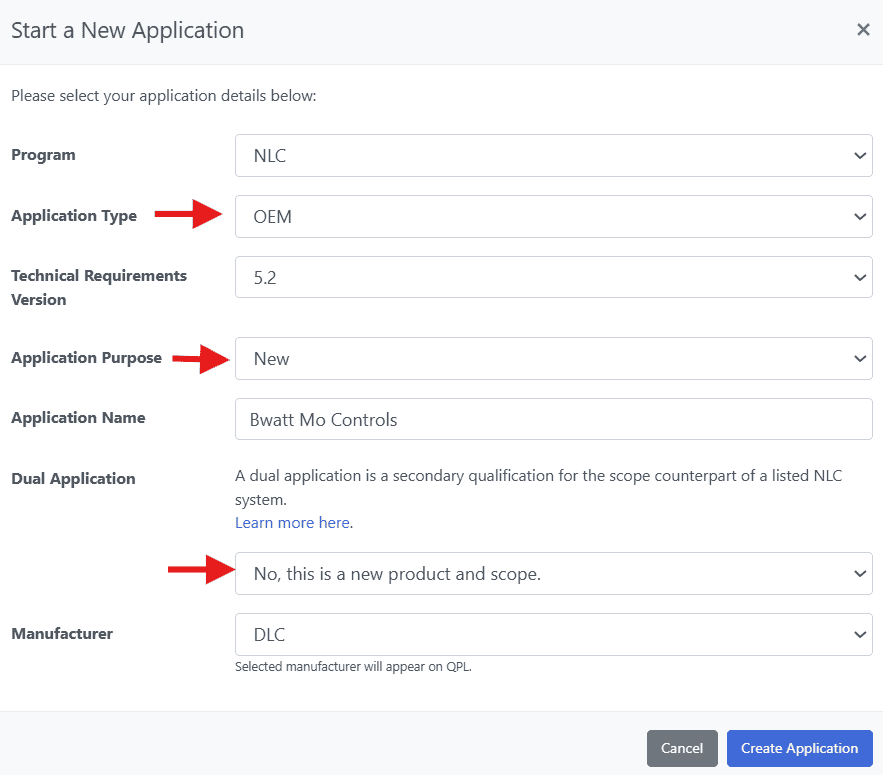
- When starting a New OEM application, select the Technical Requirements version that matches your system. Choose V5.2 only if your system meets the requirements for thermostat integration OR the ANSI C137.9 configuration report. Otherwise, select V5.0 to create your application. Selecting the wrong version may require canceling the application and creating a new one.
- Before claiming thermostat integration, review the NLC–Thermostat Integration Submission Guide for the documentation required to support that capability.
- To review the ANSI C137.9 requirements, visit the ANSI website; a sample report generated by the system must be submitted with the application to claim this capability.
How to Apply
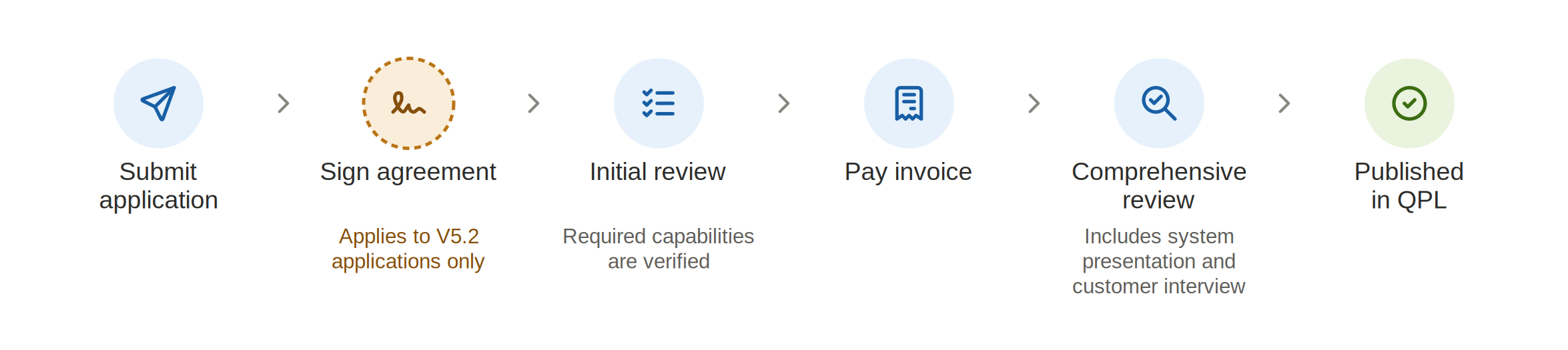
Please follow the steps below to complete and submit an application:
- Create or log into your MyDLC account. If you have not done so already, create a MyDLC account with the DLC. Once logged in, select the manufacturer you will be submitting on behalf of. Enter the Application Portal by clicking on the blue Application Portal button. Note that this button is only accessible for manufacturers and users authorized to submit applications. Quick-start guides on creating a MyDLC account can be found here.
- The DLC recommends that the application be completed by a person with deep technical knowledge of the lighting system, such as a product manager or engineer. For faster processing, this person should be readily available through the duration of the application review process to answer any technical questions the DLC has on the submitted application. Experience has shown that applications submitted by sales, marketing, or administrative staff often lack important details which delay overall processing.
- Start a new application
- Select “NLC” program and “OEM” application type, name the application for your reference, and select the manufacturer you are submitting on behalf of.
- Completing the Application:
- Gather all of the reference documents needed to reference the functionality of the system.
- Gather all of the reference documents needed to reference the functionality of the system.
- Upload supporting documentation:
- Upload all of the reference documents needed to reference the capabilities claimed in the questionnaire.
- The following documents are required for each application:
- Warranty document(s): Legal warranty document explaining warranty terms and conditions.
- Terms of Use Statement (e-signed after filling out the application form).
- All product literature and supporting documentation required by the Application Form.
- For “Required” capabilities, the documentation must be publicly available on a website, and/or included with the product packaging, and/or provided to the customer upon request. It should not be a document produced for the sole purpose of obtaining DLC qualification without further use for customers.
- Whenever possible, the DLC prefers to receive a public-facing marketing document, such as might be posted on a product website or sent to a potential customer. For some questions, the answer may be a screenshot or short video clip showing how to use an app or software program to achieve a particular result.
- Complete the online application questionnaire:
- Complete the questionnaire ensuring that all required questions are answered and every answer is referenced with a supporting documentation for verification. A common issue that usually delays the qualification timeframe is that claimed features are not supported by proper references in the application.
- Your answers will be auto-saved, and you may exit and return to the questionnaire at any time
- Complete the Terms of Use agreement and submit the application.
- If you plan to submit multiple applications in a related family of systems, contact info@designlights.org to request a meeting to develop the application plan and sequence of applications. In most cases, you should complete one parent application first, and then additional family applications after the parent has been reviewed.
Terms of Use
- Application reviews will not begin until the application is submitted. Once you have clicked “Submit,” you will be presented with the Terms of Use agreement that includes the Logo Guidelines Compliance Statement, Surveillance Testing Compliance Statement, and Safety Certification Compliance Statement. Full text of the agreement is available here. Sign the agreement to submit your application.
- For those applicants who do not have the appropriate level of authority to agree to the Terms of Use, it is recommended that the signing authority create a DLC account under your company’s organization and digitally sign off once the application is complete.
Common Mistakes to Avoid
Most delays and rejections trace back to a handful of avoidable issues. Check these before you submit:
- Documentation that doesn’t actually show the capability. This is the most common cause of delays. Every capability you claim must be backed by a document upload and a reference citation that explicitly demonstrates that feature – point to the exact page, section, or line that states it. Reviewers cannot approve a claim if the cited material only implies the capability, describes a different feature, or doesn’t mention it at all.
- Selecting the wrong Technical Requirements version. Choose V5.2 only if your system meets the thermostat-integration or ANSI C137.9 configuration-report requirements; otherwise create the application under V5.0.
- An ineligible customer reference. The field site cannot be your headquarters or a sales representative’s office, and a business partner directly connected to you (such as a lighting sales rep) does not qualify. Use an unbiased third-party site where the system has actually been installed and operated.
- Not meeting the “Required” capabilities for the scope. Confirm your system meets every Required capability before applying. In some cases, clear instructions on how to configure the capability is required. Scheduling is required for Outdoor – an Indoor-qualified system does not automatically meet the Outdoor requirements.
- Applying under the wrong version for the scope.2 updates apply to Indoor only. If you’re qualifying an Outdoor scope, that listing qualifies under V5.0; V5.2 Indoor capabilities do not carry over.
- Answering “No” to a required thermostat-integration capability. For thermostat listings, the core occupancy-data capability is required. If your system doesn’t have it, the system cannot be listed for thermostats. Review Table TH-1 in NLC Technical Requirements carefully before completing those questions.
- Leaving the DocuSign agreement unsigned. For V5.2 Indoor applications involving thermostat integration, the application holds in “Awaiting Signature” status until both the NLC and thermostat manufacturers sign. Enter the correct signatory name and email up front, and make sure both parties sign promptly – application does not advance to review until the agreement is completed.
How the Review Process Works
- The process begins with an initial review confirming that the system has all “Required” capabilities and that all documentation was submitted with the application; reviewers will contact you through the Application Portal to resolve any concerns.
- Once the initial review is complete, an invoice is issued. The DLC will accept credit cards, check, or EFT for invoice payments.
- After payment, a comprehensive review of the application’s “Reported” capability claims takes place.
- The System Presentation follows, and then a Customer Interview.
- The system is published on the QPL once this process is complete.
- The DLC will provide feedback on the status of your application via the application portal.
- You will receive notifications when a reviewer sends you a message regarding your application and must respond to these messages in the application portal which includes adding additional documentation.
- Application materials submitted outside of the portal will not be accepted.
- If your application is missing information, required information is insufficiently documented, or the provided information shows the system does not meet the Technical Requirements, the DLC will identify the specific areas in the application that need attention and allow you to fix problems and errors and resubmit.
- An application determining that the system does not meet the Technical Requirements may not be resubmitted; it must be submitted as a new application with updated application materials and appropriate application fee.
System Presentation
As part of the Application Review Process, to help DLC understand the system, the applicant will conduct a 1 hour overview of the system for DLC via webinar. This will be scheduled after the comprehensive review of the application. Note that the presentation is required only for NEW OEM applications.
- Brief, general overview of your company
- Overview of the system you are submitting for qualification:
- System name, type, architecture, communication platform
- Overview of key system components
- Market
- When the system became commercially available
- Information on installations to date
- What markets and customer types are being targeted for the system
- How the system implements the required capabilities from the DLC specification
- How the system addresses barriers of complexity and cost, standardization, interoperability
- How the system is installed, started up, and commissioned
- Savings the system provides in terms of ease of installation, wiring, start-up, commissioning
- Startup and commissioning
- Who is responsible, resources required
- Overview of Process & timing
- Grouping of Luminaires
- Defining Control Zones
- Any auto-Commissioning or learning features
- Default Settings, any out-of-the-box features
Customer Interview
- A case study or a customer reference of a field site where the NLC has been installed that the DLC may contact to verify all “Required” capabilities of the system is required.
- Please note that the site cannot be the manufacturer HQ or a sales rep’s office. A business partner directly connected to the applicant such as a lighting sales rep, does not qualify. DLC wishes to confirm with an unbiased third party that the system has been installed and operated successfully in at least one actual field installation. This contact information will not be shared with any other parties.
Note that Customer Interview is required only for NEW OEM applications
Fees
The fee is prorated based on the time the application is submitted. Click here for more details on fees for single application, qualifying for both indoor AND outdoor, and Private Labels.
Review Timeline
The timeline to review an application is projected at 3-4 weeks but may be longer or shorter depending on the number of applications already in queue, application completeness, and responsiveness to questions that arise during application review. The DLC can provide an estimated review time once full applications are submitted, and the fee is paid.
© 2026 DesignLights Consortium. The DesignLights Consortium is a project of Efficiency Forward, Inc., a non-profit 501(c)3 organization. Privacy Policy Terms of Use